
-
Please try to be as accurate as possible with your search.
-
We can quote you on 1000s of specialist parts, even if they are not listed on our website.
-
We can't find any results for “”.
Bently Nevada 3500 Module and I/O Pairing: How to Verify the Complete Assembly


A Bently Nevada 3500 main module and its rear I/O must be identified as one installed assembly. Start with their shared rack position, then verify the monitor function, permitted I/O family, termination method, barrier arrangement, connectors, wiring, complete part numbers, and document revisions. A matching series name or similar faceplate is not enough. Any missing field should remain Unknown until a site record or applicable OEM document resolves it.
Map the Front Module to the Rear I/O Position Before You Search
The first task is physical mapping, not catalog searching. The official 3500 System datasheet, document 162096 Rev. J, pages 2 and 10, explains that a main module connects to the rack backplane and its associated I/O connects to the other side of that backplane. In a panel-mount rack, the I/O is behind the main module. In a bulkhead-mount rack, the I/O is above the associated main module.
Photograph both sides before removing anything. Use a temporary slot label in every image so that the front and rear records cannot be separated later. A useful sequence is:
- Photograph the complete front of the rack with slot positions visible.
- Take a close photo of the front module label, faceplate, LEDs, and adjacent slot markers.
- Photograph the complete rear or bulkhead side from the same orientation.
- Take a close photo of the associated rear I/O label, connectors, terminal headers, and attached cables.
- Record the rack tag, machine or train, cabinet, physical location, date, and photographer.
- Save the current rack configuration export or project record when available.
The record should preserve evidence rather than a later interpretation. Keep the original image files, configuration export, drawing revision, and maintenance work order. Add the source, capture date, installation position, upstream sensor or plant connection, and downstream protection or communication role. If the rear label is hidden or a cable cannot be traced safely, enter Unknown; do not fill the gap with a likely part number.
For procurement, the minimum physical relationship should read like this:
| Record Field | Required Entry |
|---|---|
| Asset and rack | Plant tag, machine or train, cabinet, rack type |
| Front position | Slot or reserved position, front photo filename |
| Front identity | Series designation, complete order number, hardware or revision markings |
| Rear position | Matching backplane position, rear photo filename |
| Rear identity | Complete I/O or PIM part number, termination and barrier markings |
| Installed relationship | Sensor, field wiring, relay circuit, network, or power input served |
| Evidence status | Confirmed, Conditional, or Open Question |
This position map prevents a common failure: sending a clear front-module photo while the rear I/O, terminal hardware, and field cable remain unidentified.
Identify the Monitor Function and Its Permitted I/O Families
The front module's function determines which I/O evidence is relevant. Do not treat all 3500 I/O modules as interchangeable because they share a rack family. Use the ordering section and I/O table for the exact module document revision, then confirm that the installed channel type and termination arrangement fit that option.
| Front Role | What the Rear Side Must Preserve | Primary Decision Evidence |
|---|---|---|
| TDI | Ethernet medium, Rack OK relay contacts, system contacts, grounding arrangement | TDI I/O type, network connector, complete rear part number |
| Proximitor or seismic monitor | Transducer family, channel allocation, terminations, barrier arrangement | I/O option table, field sensor type, channel configuration |
| Relay module | Relay output type, contact arrangement, fail-safe or low-current variant where applicable | Output module identity, alarm logic record, terminal wiring |
| Power supply | Input voltage family, rear PIM type, primary or backup position | Supply label, PIM label, source voltage, rack power arrangement |
For example, the 3500/42M datasheet, document 143694 Rev. AE, pages 14 and 18, provides separate I/O choices for internal termination, external termination, internal barriers, Shaft Absolute inputs, and Prox/Velom inputs. Those options preserve different field interfaces. A purchase decision therefore starts with the measurement assigned to each channel, not with the 3500/42M series name alone.
3500/42M I/O Options at a Glance
The table below turns the OEM ordering data into a procurement screen. It does not make the options interchangeable. The installed measurement, transducer, channel assignment, termination hardware, barrier design, approvals, and rack configuration must still agree.
| I/O Part Number | Termination and Barrier Type | Supported Input Arrangement | What the Buyer Must Verify |
|---|---|---|---|
| 128229-01 | Internal terminations | Seismoprobe. Prox/Accel and Velomitor are supported but not recommended. | Field wires land on the rear I/O. Do not specify an external termination block for this option. |
| 128240-01 | External terminations | Seismoprobe. Prox/Accel and Velomitor are supported but not recommended. | Identify the external termination block and multipin cable as separate assembly items. |
| 135489-01 | Internal barriers and internal terminations | Channels 1-4: Prox/Accel | Match all four sensors, the approved intrinsic-safety loop, and the applicable installation drawing. |
| 135489-02 | Internal barriers and internal terminations | Channels 1-2: Prox/Accel; channels 3-4: Velomitor | Preserve the two-plus-two channel allocation; do not treat the four channels as freely assignable. |
| 135489-03 | Internal barriers and internal terminations | Channels 1-4: Velomitor | Match all four sensors, the approved intrinsic-safety loop, and the applicable installation drawing. |
| 138708-01 | Shaft Absolute I/O with internal terminations | Prox with Velomitor, or Prox with Seismoprobe | Verify the paired sensors, channel use, direct field termination, and Shaft Absolute configuration. |
| 138700-01 | Shaft Absolute I/O with external terminations | Prox with Velomitor, or Prox with Seismoprobe | Verify the paired sensors and include the correct external termination hardware and cable. |
| 140471-01 | Prox/Velom I/O with internal terminations | Prox/Accel, Velomitor, or HTVS | Confirm the installed transducer family, channel configuration, and direct termination arrangement. |
| 140482-01 | Prox/Velom I/O with external terminations | Prox/Accel, Velomitor, or HTVS | Confirm the transducer family and identify the external termination block and cable. |
Source: Baker Hughes, 3500/42M Proximitor Seismic Monitor Datasheet, document 143694 Rev. AE, pages 14 and 18.
The I/O part number is a routing key to the correct wiring and approval record, not a stand-alone compatibility decision. The following excerpts reproduce the applicable OEM tables so the buyer can compare the order option, termination arrangement, input configuration, and channel allocation against the installed assembly.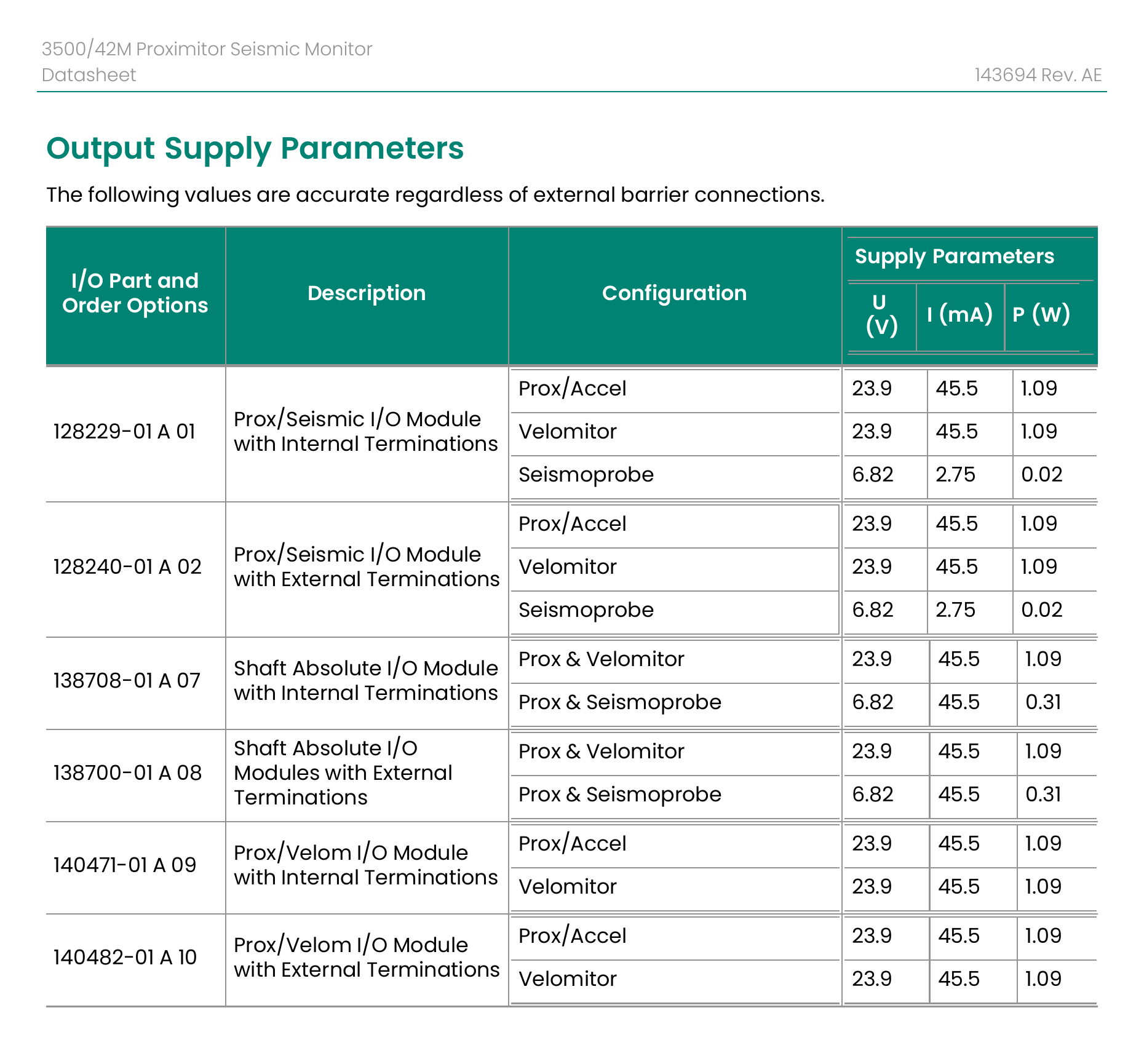
Figure 1. Original OEM output-supply table for the 3500/42M I/O options. Source: Baker Hughes, document 143694 Rev. AE, page 14.
The table separates internal-termination and external-termination versions and shows why the rear part number controls more than physical fit.
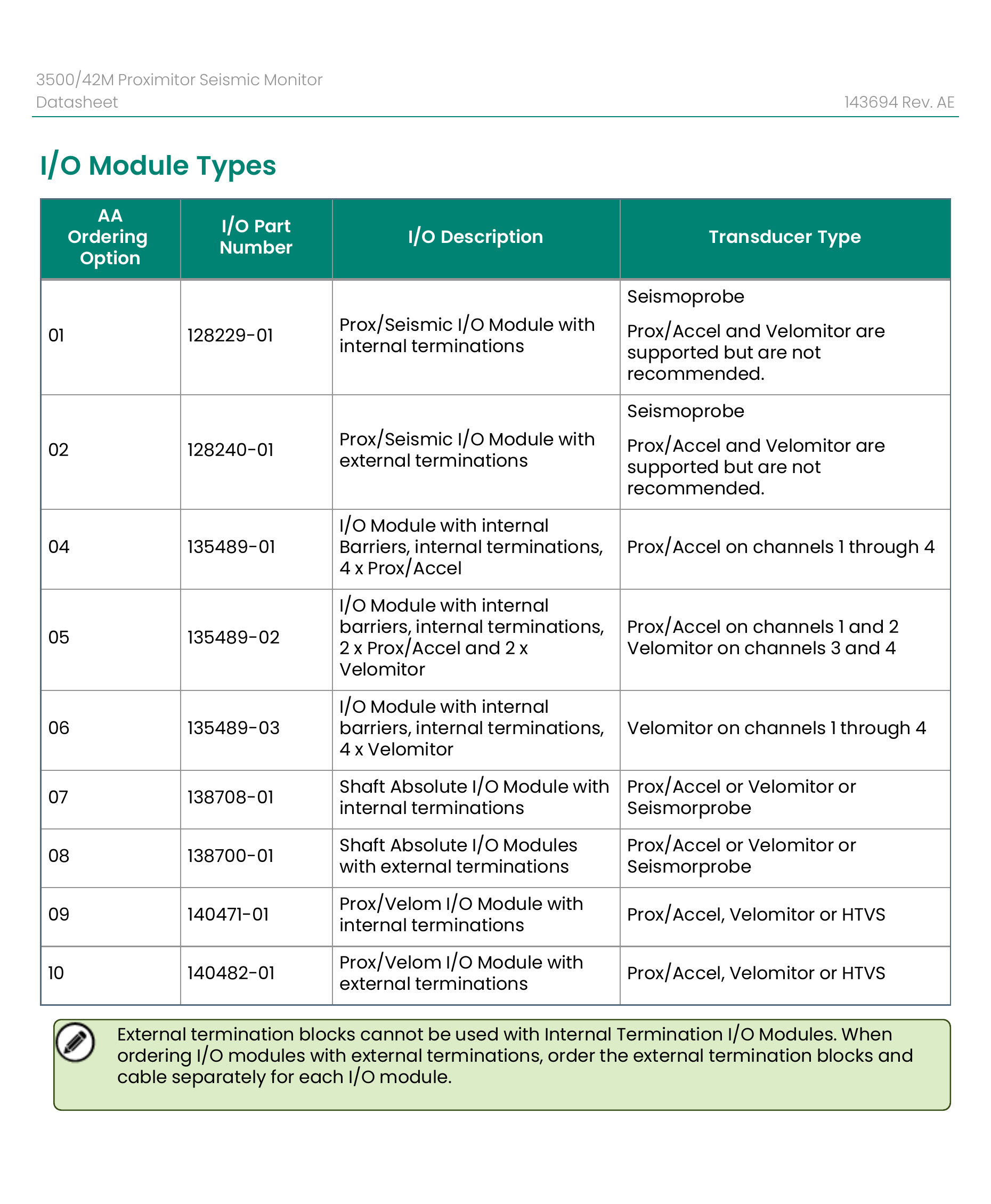
Figure 2. Original OEM I/O Module Types table, including termination, barrier, transducer, and channel-allocation options. Source: Baker Hughes, document 143694 Rev. AE, page 18.
The OEM note also states that external termination blocks cannot be used with internal-termination I/O modules. When an external-termination I/O is ordered, the termination block and cable must be treated as separate assembly items.
Do not choose among these options from the 3500/42M name alone. Record the rear I/O part number, every channel's sensor and measurement, the termination hardware, and the applicable approval drawing before the RFQ is approved.
Internal Versus External Termination
Internal termination means field wires land directly on the I/O module's terminal headers. External termination moves the field wiring to a separate termination block, which connects to the I/O through a pre-engineered multipin cable. The system datasheet describes both arrangements, and the 3500/42M ordering information states that external termination blocks cannot be used with internal-termination I/O modules.
For an internal-termination assembly, capture:
- The I/O label and option number.
- Every terminal header and installed connector.
- Wire numbers, shield treatment, and channel-to-terminal mapping.
- Clearance behind the rack and the route used to service the conductors.
For an external-termination assembly, also capture:
- The termination block part number and installed location.
- The cable part number, length code, connector orientation, and assembly status.
- Both ends of the cable and any cabinet drawing that assigns the block.
- Spare space and bend radius needed for the replacement route.
An external-termination I/O by itself is not a complete field interface. The RFQ must include the required block and cable or state that the existing accessories will be retained after engineering verification.
Barrier Versus Non-Barrier I/O
Barrier selection is a hazardous-area and circuit-design question; it is not another name for external termination. The 3500 system can use internal or external intrinsic safety arrangements, but the correct choice depends on the approved loop design, connected transducer, entity parameters, installation drawing, and applicable approval.
The 3500/42M document, for example, lists different internal-barrier I/O options for four Prox/Accel channels, a two Prox/Accel plus two Velomitor arrangement, and four Velomitor channels. That channel allocation must match the installed configuration. Record the I/O part number, sensor on each channel, hazardous-area drawing, approval markings, cabinet location, and the engineer who owns the intrinsic-safety verification.
Do not infer that a barrier module is acceptable because the connector fits. Do not convert a non-barrier installation to a barrier arrangement, or the reverse, through procurement alone. Amikon Limited can help identify and source the requested hardware; the customer's qualified personnel must approve the loop, wiring, safety documentation, installation, and commissioning.
Read Both Order Numbers and Document Revisions
Record the front and rear identities independently. A complete entry includes the exact text on each label, every prefix and suffix, the document number and revision used for verification, the page containing the ordering evidence, and the date of review. Keep series names in a separate field so they cannot replace the actual part numbers.
The following examples show how to document the supplied model terms without extending the evidence to other 3500 items.
| Installed or Candidate Record | OEM Evidence Reviewed | Pairing Status | Procurement Action |
|---|---|---|---|
| 3500/22M 288055-01 front; 146031-02 rear | The 3500/22M datasheet, document 161581 Rev. AC, page 9, lists 288055-01 as the standard TDI spare and 146031-02 as the 100Base-FX fiber-optic I/O module. Page 5 defines the front and rear rack-space roles. | Conditional match for a 100Base-FX TDI assembly. The installed network medium, MT-RJ connection, rack configuration, and revision conditions still need confirmation. | Quote the two identities as separate lines tied to one rack position. Include network photos and state whether the existing fiber cable will be retained. |
| 3500/42M 176449-02 front; 128229-01 rear | Document 143694 Rev. AE, pages 16 and 18, lists 176449-02 as the 3500/42M monitor spare and 128229-01 as the Prox/Seismic I/O with internal terminations, ordering option 01. | Conditional match only when the installed measurement, transducer type, channel configuration, internal termination, approvals, and software or firmware requirements agree. | Attach channel assignments, sensor identities, terminal photos, and the relevant I/O-table page. Do not substitute an external-termination or barrier option. |
| 3500/32 125712-01 front; 125720-01 rear | The current 3500/32M datasheet, document 141533 Rev. W, page 6, identifies 125720-01 as a spare four-channel relay output module available for repair only. The same page lists 149986-02 as the 3500/32M control module; it does not establish the legacy 125712-01 relationship. | Open Question. The supplied front label and rear label must be preserved as site evidence, but their pairing requires the applicable legacy manual, service record, or other OEM evidence. | Do not change 3500/32 to 3500/32M. Request clear labels, rack position, output wiring, relay logic, and the legacy document revision before approval. |
| 3500/33 149986-01 front; 149992-01 rear | The 3500/33 datasheet, document 162301 Rev. AC, page 6, lists 149986-01 as the spare 16-channel relay control module and 149992-01 as the spare 16-channel relay output module. | Documented main and output roles for the standard 16-channel relay option. Installed approval option, relay logic, terminal wiring, and revision evidence remain site checks. | Keep both part numbers, photograph the relay-mode switches and terminals, and attach the alarm-drive-logic record. |
These entries are worked evidence records, not blanket compatibility statements. A manufacturer document can identify a permitted option or spare role, but it cannot prove the condition, firmware, previous field modification, or exact configuration of the unit in a customer's rack.
Revision control matters for another reason: an ordering table can change while an old rack remains in service. Save the actual PDF used, not only its web address. Record its document number, revision, review date, and page. If a later revision changes the available spare or adds an advisory, reopen the line item and repeat the check.
Check Connectors, Channel Wiring, and Rack-Slot Context
A part-number match is incomplete until the physical and logical interfaces match the installed task. Build one evidence sheet that places the site record, OEM requirement, and candidate-unit evidence side by side.
| Check | Installed Evidence | OEM Evidence | Candidate Evidence | Decision |
|---|---|---|---|---|
| Backplane position | Front and rear slot photos | Rack layout and reserved-position rule | Candidate role | Confirmed, Conditional, or Open |
| Connector type | Close photos and mating cable | I/O figure and ordering option | Connector photos | Confirmed, Conditional, or Open |
| Channel count and type | Configuration export and loop list | Channel-function table | Candidate label and option | Confirmed, Conditional, or Open |
| Termination | Terminal or ET-block photos | Internal or external termination rule | I/O and accessory numbers | Confirmed, Conditional, or Open |
| Barrier arrangement | Loop drawing and approval record | Approved barrier option and parameters | Candidate approval markings | Confirmed, Conditional, or Open |
| Wiring | Wire numbers, shields, commons, relay contacts | Terminal definition | Continuity or inspection record | Confirmed, Conditional, or Open |
| Hardware, firmware, software | Label and configuration backup | Version requirements or advisory | Candidate revision evidence | Confirmed, Conditional, or Open |
Similar appearance can conceal a different electrical role. Three examples show why the interface check is separate from the label check:
- The 3500/22M document distinguishes copper Ethernet I/O from 100Base-FX fiber I/O. Both serve the TDI family, but the network interface and connector are different.
- The 3500/42M internal-termination and external-termination options require different field-connection arrangements. A rear I/O that fits the rack does not supply the missing ET block and cable.
- The 3500/32M document distinguishes the standard output module from a hazardous-area and functional-safety output variant. A similar form factor does not preserve the approval or application evidence.
Assign every Open Question to an owner. Maintenance may own site photos and wire numbers; controls engineering may own configuration and alarm logic; functional safety may own the safety evidence; procurement may own candidate labels, condition, and delivery documents. A line item should not move to approved status merely because one team has completed its portion.
Worked Assembly Records for Monitor, Relay, TDI, and Power Roles
The following records illustrate the minimum reasoning needed for four different 3500 roles. They intentionally use different decision fields because a monitor, relay, TDI, and power supply do not fail or interface in the same way.
| Role | Front and Rear Record | Evidence That Controls the Decision | Status Output |
|---|---|---|---|
| Monitor | Front: 3500/42M 176449-02. Rear: 128229-01. Position: Slot 6 front and rear. Termination: internal. Channels: 1-4 listed individually. | Document 143694 Rev. AE, I/O option 01; site channel configuration; transducer labels; terminal photos; approval record. | Conditional: roles are documented, but approve only after all four channels and installed approvals match. |
| Relay | Front: 3500/33 149986-01. Rear: 149992-01. Position: Slot 11 front and rear. Relay mode and field contacts recorded. | Document 162301 Rev. AC; alarm-drive-logic export; switch settings; wire and terminal numbers; shutdown design approval. | Conditional: main and output roles are documented; site logic and circuit acceptance remain open until reviewed. |
| TDI | Front: 3500/22M 288055-01. Rear: 146031-02. Reserved TDI position. Network: 100Base-FX. | Document 161581 Rev. AC; fiber-connector photo; rack configuration; installed software and firmware record; migration history from any earlier RIM. | Conditional: fiber I/O role is documented; network and version evidence must agree. |
| Power | Front power-supply label: Unknown. Rear PIM label: Unknown. Position: upper or lower left power position. Source voltage: recorded from drawing and measurement procedure. | The 3500/15 datasheet, document 141530 Rev. P, pages 1, 2, and 6, states that the supply type and PIM must be matched and identifies incompatibilities between current and legacy AC or DC families. | Open Question: do not quote a power assembly until both labels, voltage family, primary or backup role, and legacy status are known. |
These are not substitute commissioning records. The buyer can use them to keep an RFQ accurate, while engineering retains approval of configuration, wiring, removal, installation, testing, and return to service. The system datasheet also states that an I/O module is not hot-swappable and that the front portion must be removed before the I/O is removed. Site procedures and qualified personnel must govern any work on an energized rack.
Build a Two-Sided Photo and Part-Number Package for the RFQ
The RFQ should let the supplier reconstruct what is installed without guessing. Send one package per assembly, even when several units share a rack.
Include the following files and fields:
- Full front-rack photo and full rear or bulkhead photo with matching orientation.
- Close front and rear label photos at readable resolution.
- Rack tag, machine or train, cabinet, physical position, and slot or reserved position.
- Complete front-module order number and complete rear I/O or PIM part number.
- Termination type, barrier arrangement, connector type, and accessory part numbers.
- Channel count, channel function, connected sensor or circuit, and wire or terminal identifiers.
- Current hardware, firmware, software, and configuration evidence when relevant.
- Quantity, requested condition, destination country, required-on-site date, and downtime or outage constraint.
- Requested documents, inspection evidence, warranty scope, packaging requirements, and shipping terms.
Use a controlled decision record rather than an email chain:
| RFQ Field | Evidence Source | Owner | Status | Update Trigger |
|---|---|---|---|---|
| Installed front identity | Original label photo | Maintenance | Confirmed or Open | New photo or label discrepancy |
| Installed rear identity | Original rear photo | Maintenance | Confirmed or Open | Cable removal or better access |
| Permitted I/O option | OEM document and page | Controls engineering | Confirmed, Conditional, or Open | New document revision or changed channel duty |
| Candidate identity and condition | Candidate label and supplier record | Procurement | Confirmed or Open | Revised quotation or different unit offered |
| Wiring and accessory scope | Drawing, terminal photo, cable record | Electrical or controls engineering | Confirmed or Open | Field modification |
| Engineering acceptance | Signed project or maintenance record | Customer engineering | Approved or Rejected | Any identity, revision, or configuration change |
| Commercial acceptance | Formal quotation | Procurement | Approved or Rejected | Price, condition, quantity, warranty, or delivery change |
Amikon Limited can review the submitted identities, locate relevant manufacturer documents, prepare a quotation, and support sourcing for the requested assembly. Browse our 3500 System parts page or use the existing 3500 overview for system-level orientation. Availability, unit condition, date code, delivery, and warranty must be confirmed for the exact item in a formal quotation.
Amikon Limited is an independent supplier and is not authorized by or affiliated with the manufacturer. OEM warranties do not apply. The customer's qualified personnel remain responsible for compatibility approval, firmware or license requirements, functional-safety validation, installation, programming, testing, and commissioning.
FAQs
Q1. What If the Rear I/O Label Cannot Be Read?
Keep the field as Unknown and collect alternative evidence: the rear position, connector layout, terminal count, cable destination, configuration export, cabinet drawing, and maintenance history. These clues can narrow the document search, but they should not be converted into a final I/O part number without a readable label or applicable OEM record.
Q2. Does a Matching Part Number Prove Firmware Compatibility?
No. A matching hardware identity does not prove that the installed firmware, rack configuration software, System 1 connection, or feature set is acceptable. Record the current versions and check the exact module manual, software requirements, upgrade advisories, and customer change-control rules before approval.
Q3. Can the Rear I/O Module Be Hot-Swapped?
No. The 3500 System datasheet states that I/O modules are not hot-swappable. It also instructs that the front-panel portion must be removed first so power is removed from that slot before the I/O is removed. Qualified personnel must follow the applicable site procedure and OEM instructions.
Q4. What Should Receiving Inspection Compare After Delivery?
Receiving should compare both labels, connector and terminal layout, barrier and termination markings, hardware revision, condition, accessories, quantity, packaging, and supplied documents with the approved RFQ record. Any mismatch should be quarantined and resolved before the unit reaches the rack or field wiring.
Q5. When Should an RFQ Line Be Reopened?
Reopen it when the supplier offers a different unit, the OEM document revision changes, a clearer site photo reveals another suffix, the channel duty or wiring changes, or the delivery includes a different condition or accessory scope. The previous approval applies only to the recorded evidence set.
Verify the Assembly Before You Approve the Line Item
Treat the front module, rear I/O or PIM, installed interfaces, and configuration evidence as one controlled record. If any identity or application field remains unresolved, keep the decision Conditional or Open rather than calling the assembly compatible. For sourcing support, send the two-sided photo package and complete part-number record to our sourcing team. We will confirm the commercial scope for the exact requested item while your qualified engineers retain technical approval.
Keep your system in play!
Top Media Coverage
Categories

Related articles Browse All
-
 BlogImplementing Vision Systems for Industrial Robots: Enhancing Precision and Automation2025-08-12 11:26:54Industrial robots gain powerful new abilities through vision systems. These systems give robots the sense of sight, so they can understand and react to what is around them. So, robots can perform complex tasks with greater accuracy and flexibility. Automation in manufacturing reaches a new level of ...
 -
 BlogOptimizing PM Schedules Data-Driven Approaches to Preventative Maintenance2025-08-21 18:08:33Moving away from fixed maintenance schedules is a significant operational shift. Companies now use data to guide their maintenance efforts. This change leads to greater efficiency and equipment reliability. The goal is to perform the right task at the right time, based on real information, not just ...
 -
 BlogThe Evolution of Steam Turbine Control Systems2026-03-31 08:33:35CALL US:+86-18020776786 | E-MAIL:INFO@AMIKON.CN In-depth analysis of the GE Mark VIe control system Mark VIe: A Modern Mainstay for Industry 4.0 Mark VIe's core concepts are "high availability, open connectivity, and intelligent readiness." It utilizes comm...


- Q&A
- Policies How to order Part status information Shipping Method Return Policy Warranty Policy Payment Terms Email Marketing Policy VAT and Import Information
- Asset Recovery
- We Buy Your Equipment. Industry Success stories Amikong News Technical Resources Why choose us FAQs
- Registered Address
-
32D Guomao Building, No.388, Hubin south Road, Siming district, Xiamen,Fujian, China

Leave Your Comment