
-
Please try to be as accurate as possible with your search.
-
We can quote you on 1000s of specialist parts, even if they are not listed on our website.
-
We can't find any results for “”.
Panel PC Intel i5 Fanless Design For Industrial Use


As someone who has spent a career integrating control systems into very unforgiving environments, I have learned that the PC on the panel is never “just a PC.” When you put Intel i5 performance into a fanless panel design and bolt it to a machine that runs nonstop, you are making choices that will either quietly pay off for years or quietly cook themselves to death inside a cabinet.
This article walks through how Intel i5 fanless panel PCs really behave in industrial use, what the design tradeoffs look like, and how to specify and deploy them so they run reliably instead of becoming your next downtime incident.
From Office Towers To Fanless Panel PCs
Traditional desktop PCs were designed for carpeted offices, not dusty packaging halls or washdown lines. Sources such as Teguar and AOPEN describe how early automation projects often stuffed office PCs into bulky cabinets, then fought constant failures from dust, vibration, and narrow temperature ratings.
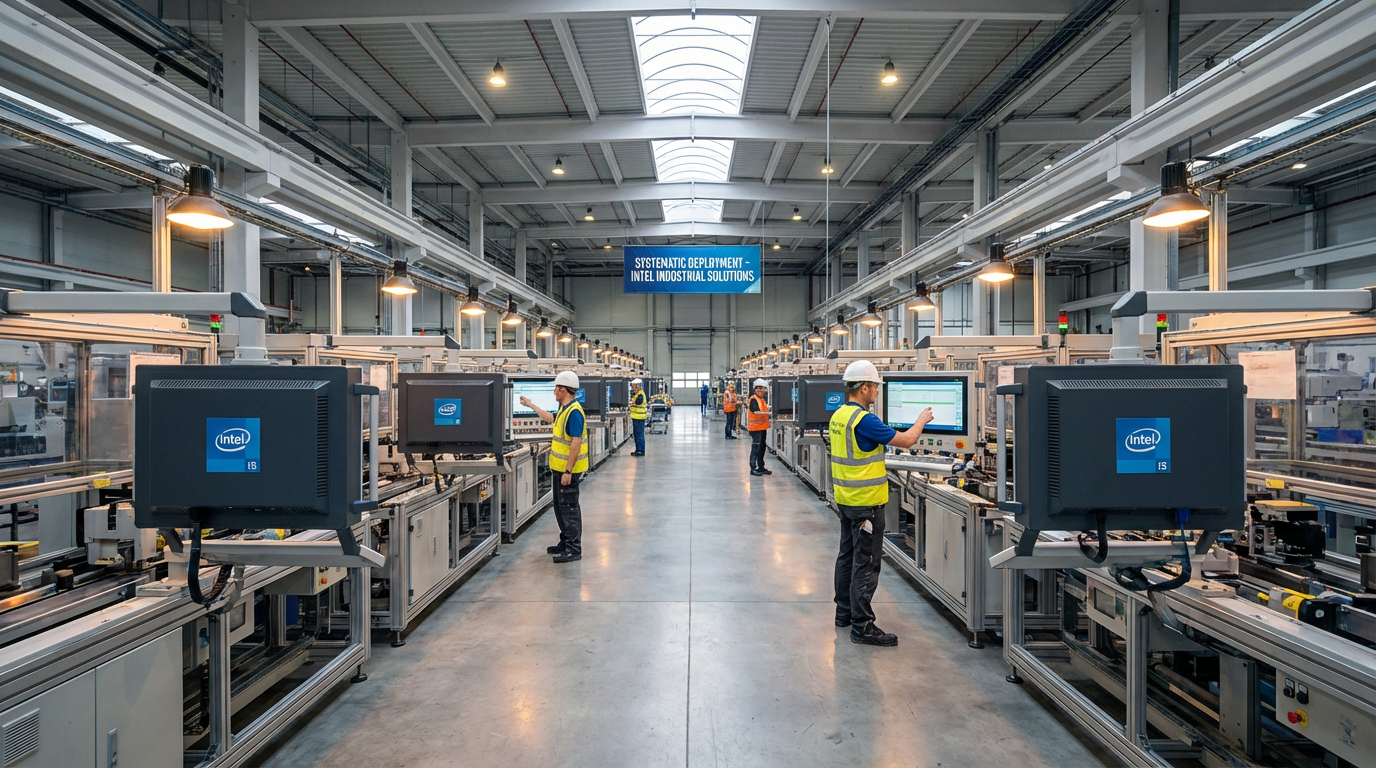
Industrial panel PCs emerged as a direct response. Vendors like Teguar, Hatteland, and AOPEN define a panel PC as an all‑in‑one industrial computer that integrates the display, processor, storage, and I/O inside a single rugged enclosure, usually with a touchscreen front. That enclosure is often sealed and fanless, with wide temperature ratings and shock resistance so it can live on the machine instead of in a protected control room.
In parallel, industrial PC manufacturers and integrators shifted toward maintenance‑free automation. Beyond Info System notes that global Industry 4.0 initiatives now favor fanless panel PCs specifically engineered for 24/7 operation, energy efficiency, and robust connectivity. The industry goal is simple: remove mechanical failure points, reduce on‑site maintenance, and keep production running.
What Is An Intel i5 Fanless Panel PC?
A fanless industrial panel PC with an Intel i5 processor is essentially three things in one compact unit:
It is a ruggedized display, typically a resistive or projected‑capacitive touchscreen engineered for industrial use. Teguar and Hatteland point out that these displays are built to withstand constant use, allow gloved operation, tolerate chemical exposure, and in many cases handle washdown cleaning.
It is an industrial computer built around an Intel Core platform that includes i3, i5, or i7 options, as Teguar and several panel PC vendors describe. When you choose an i5‑class CPU, you are targeting a mid‑range sweet spot: more compute headroom than Atom or Celeron, without jumping to the very high power budgets of desktop‑class Core i7. This is important for fanless thermal design, which we will unpack in a moment.
It is an I/O hub and network node.
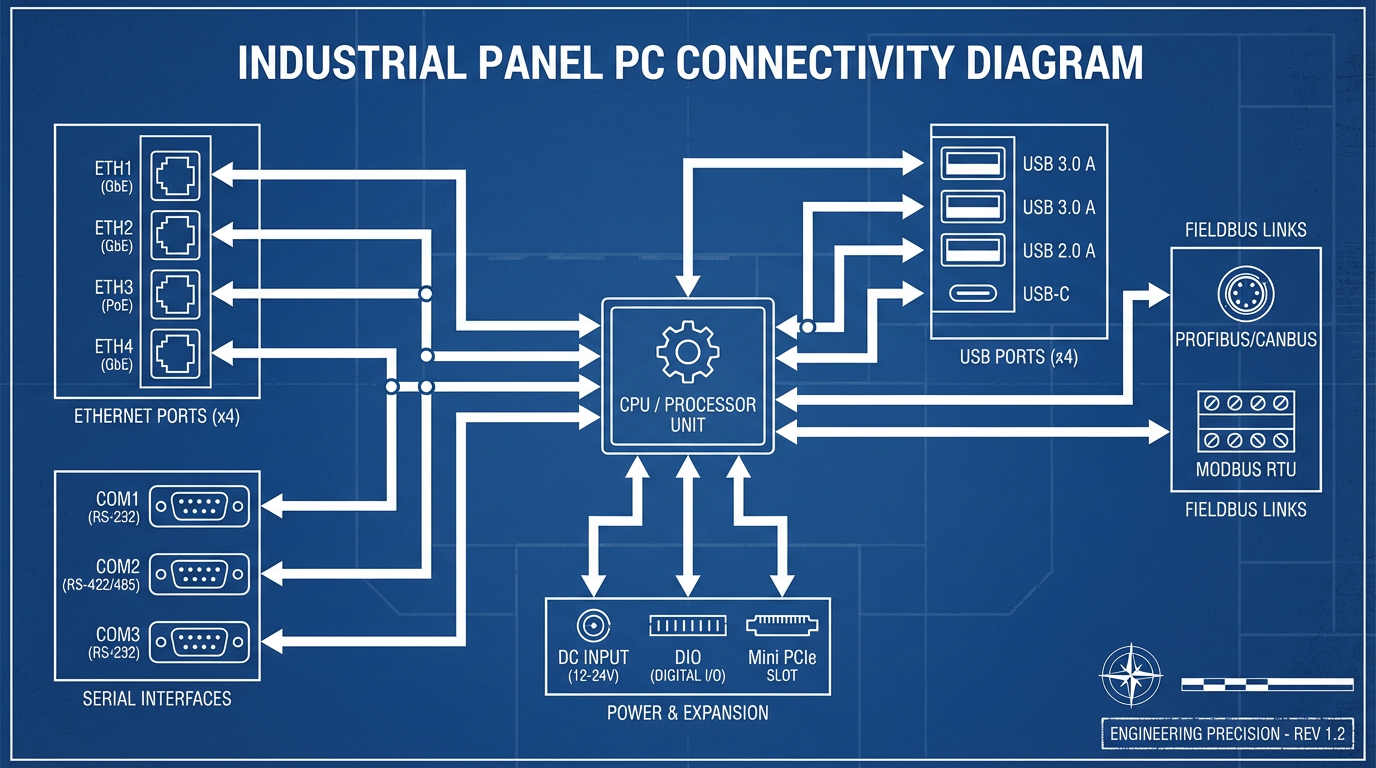
Panel PCs from ASUS, Maple Systems, and others offer multiple Ethernet ports, serial ports (RS‑232/422/485), USB variants, and sometimes digital I/O or fieldbus interfaces. That lets them talk directly to PLCs, drives, sensors, and SCADA or MES systems while also acting as an edge computing device for IIoT and analytics.
Unlike a consumer PC, a fanless panel design does not rely on fans or open vents for cooling. Instead, it uses a sealed or nearly sealed chassis, typically made of aluminum or stainless steel, with internal heat spreaders and external fins to move heat out to the surrounding air.
Fanless Cooling In Plain Terms
Several sources, including Corvalent, Assured Systems, Valano IPC, and OnLogic, describe how fanless cooling actually works.
Instead of a fan pulling air through the chassis, heat from the CPU, GPU, and power circuitry is conducted into an internal heat spreader. From there, it transfers into the outer chassis or dedicated heatsinks, often made from aluminum or copper with large finned surfaces. Valano IPC notes that fanless panel PCs depend on a formal power budget: typical CPUs consume about 5–15 W, integrated GPUs about 10–30 W, and memory and SSD storage a few watts more. The thermal design must dissipate that combined load passively.
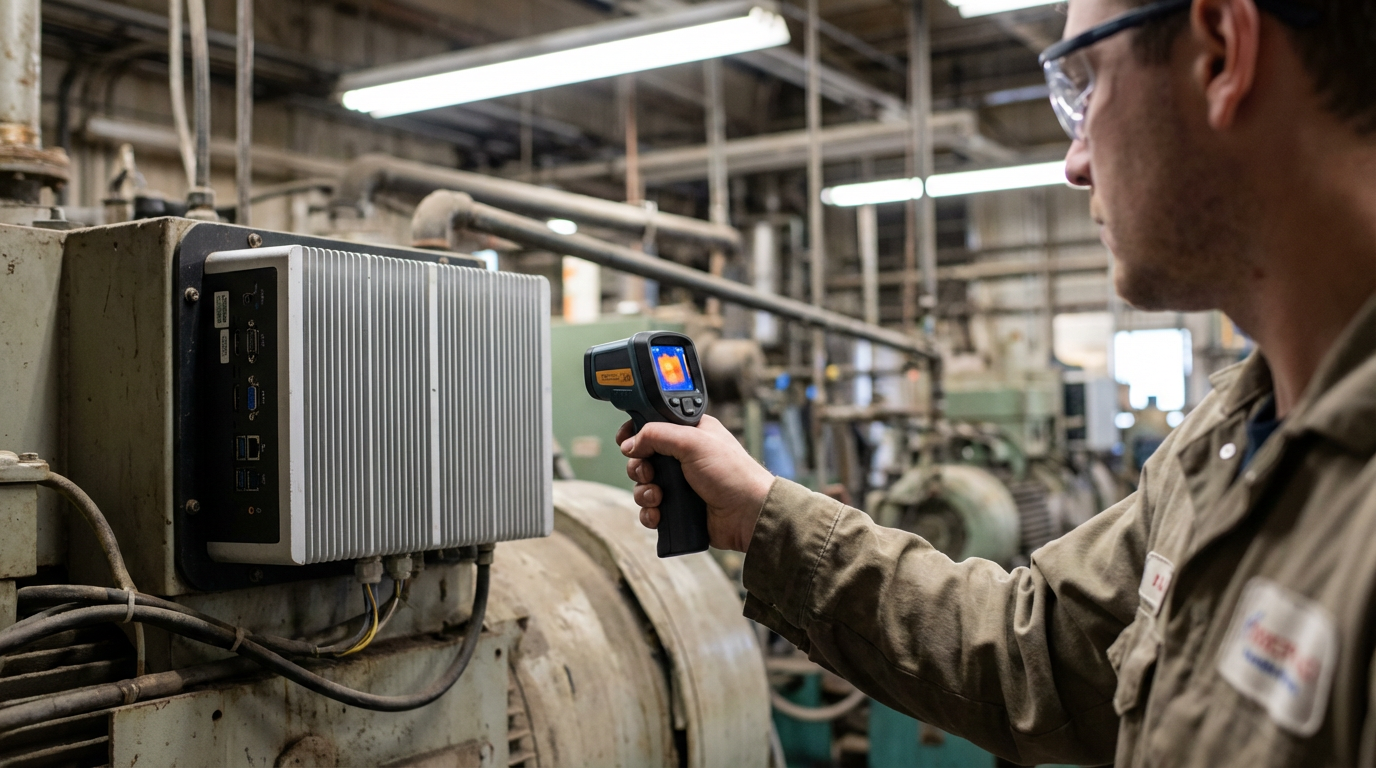
Things Embedded explains that when a fanless industrial PC is operating correctly, the chassis will feel warm to the touch. That is not a defect; it is evidence that heat is being pulled out of the electronics and into the enclosure, where natural convection and radiation can remove it. They recommend occasionally checking chassis surface temperature with an infrared tool; if the temperature exceeds the rated operating range, the installation needs to be revisited.
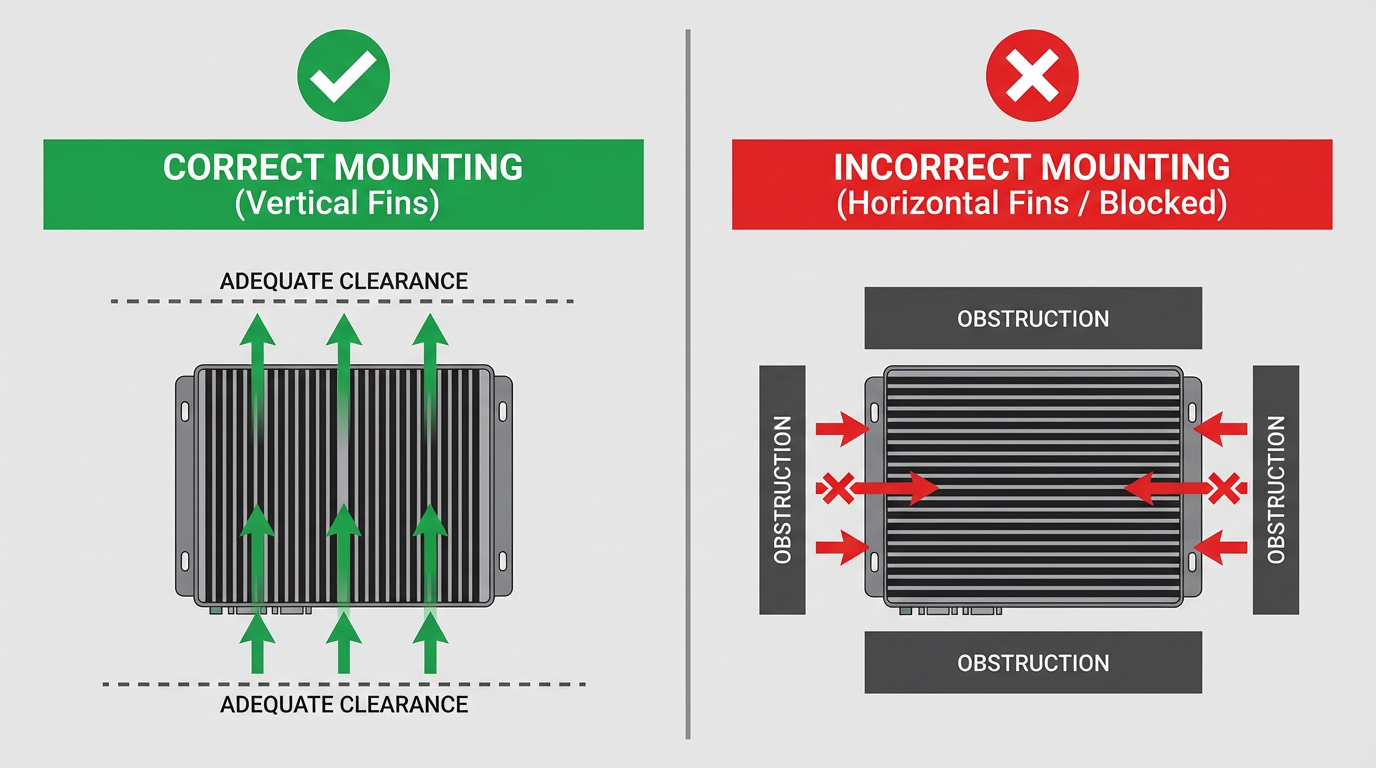
This is why enclosure design matters. Valano IPC highlights the role of fin orientation, direct thermal paths from hotspots to the outer case, and external fins on the chassis. Things Embedded and Voltrium both emphasize that if you bury a fanless i5 panel PC in a sealed cabinet, stack equipment on top of it, or mount it with fins facing downward and no clearance, you have effectively removed its heatsink. The system will then throttle or eventually fail, no matter how good the silicon is.
Why Combine Intel i5 Performance With Fanless Design?
Choosing an Intel i5 in a fanless panel PC is not about chasing benchmark numbers; it is about matching compute capability to real workloads — HMIs, MES dashboards, edge analytics, or machine vision — while staying inside a passive cooling envelope.
Reliability And Dust Resistance
Corvalent, Assured Systems, Maple Systems, and OnLogic all converge on a simple reality: fans are a major failure point in industrial computing. Active cooling pulls in dust, metal chips, fibers, and oil mist. These contaminants clog heatsinks, degrade airflow, and eventually cause overheating and shutdowns. They also introduce a continuous maintenance burden: someone has to clean or replace those fans and filters.
Fanless panel PCs eliminate this failure mode.
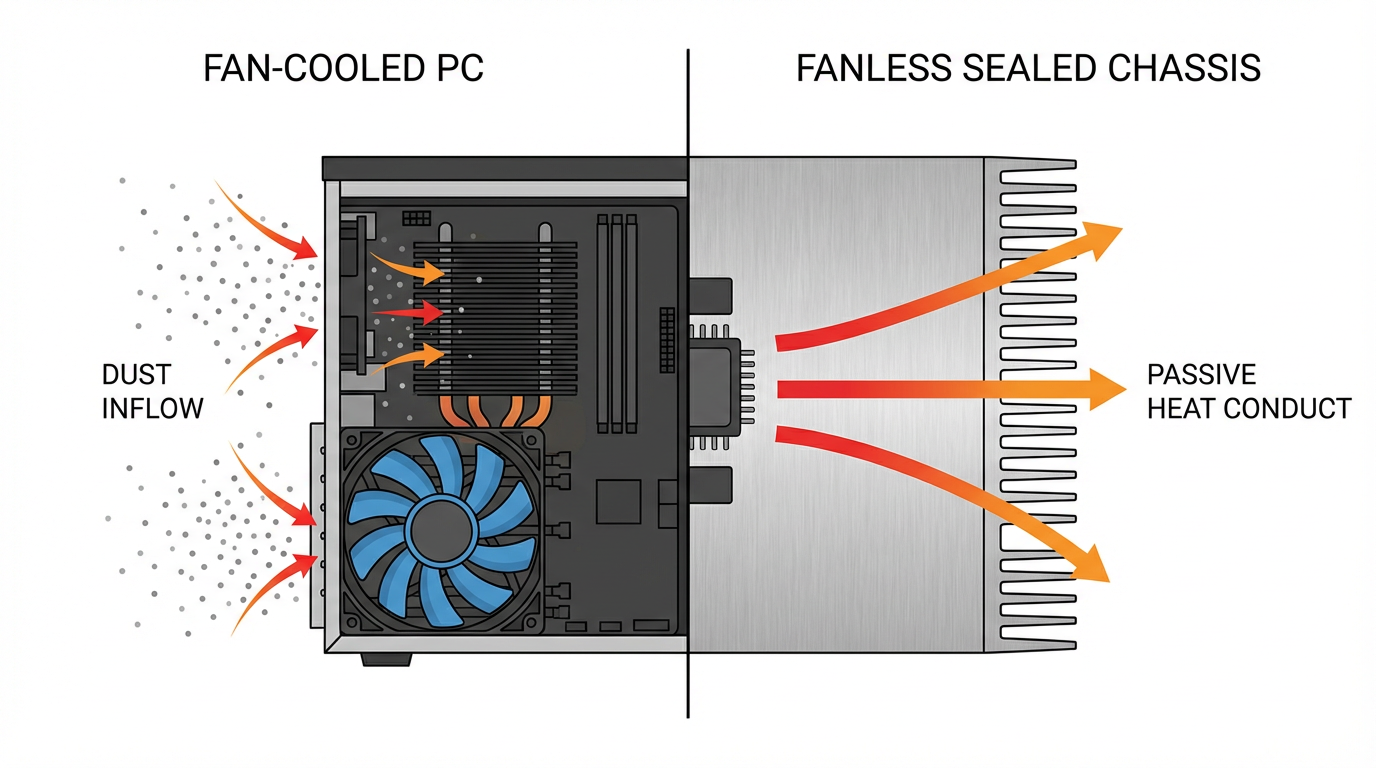
With sealed or tightly controlled enclosures and passive cooling, there are no fans to ingest contaminants or wear out. Solid‑state drives replace spinning hard drives, removing another source of mechanical failure and vibration sensitivity. Corvalent describes how, in dusty plants, fanless sealed panel PCs run for long periods without the cleaning cycles that conventional PCs require.
Intel i5 performance does not change that fundamental equation; it simply lets you run more demanding workloads within the same rugged fanless envelope, provided the power budget and thermal design are appropriate.
Wide Temperature And Harsh Environments
Industrialmotherboard.in, Maple Systems, and multiple panel PC vendors describe typical operating ranges for fanless industrial PCs that extend far beyond office conditions. Standard models often cover roughly 32°F to 122°F, while extended‑temperature units can run from around -4°F up to 140°F, and some are designed for environments from about -40°F to 158°F.
Fanless panel PCs are also built to handle vibration and shock. Maple Systems and OnLogic point to reinforced motherboards, solid‑state storage, and rugged chassis as key elements that keep systems running on production machinery, vehicles, and mobile equipment. Assured Systems recommends fanless industrial computers with appropriate ingress protection (such as IP66, IP67, or IP69K) where spraying, dust, or outdoor exposure are expected.
Teguar notes that many industrial panel PCs include front bezels rated from IP65 up to IP69K, and Beyond Info System describes stainless steel models using SUS304 or SUS316 for corrosion‑resistant, food‑grade and pharmaceutical environments. In those settings, a fanless, sealed Intel i5 panel PC can tolerate washdowns and chemical exposure that would destroy a vented office tower.
Continuous Operation, Energy, And Noise
Modern industrial panel PCs are expected to run nonstop. Breaking AC and WeAreConker both emphasize 24/7 operation as a core design goal. OnLogic cites ITIC data showing how severe downtime costs have become: for 91 percent of surveyed enterprises, one hour of downtime costs more than $300,000, and for 44 percent the cost is between $1 million and $5 million per hour. Those numbers justify investing in more reliable, lower‑maintenance hardware.
Fanless i5 panel PCs contribute on multiple fronts. OnLogic reports that fanless systems can use up to about 66 percent less power in some scenarios compared with traditional fanned desktops, largely because they are designed around lower‑power platforms and do not spend energy running internal fans. Voltrium notes that fanless industrial PCs often accept wide DC input ranges, for example roughly 8–48 V DC, which makes them easier to power from existing industrial supplies.
Noise is another factor. Fanless systems run silently, a benefit in noise‑sensitive environments such as laboratories, cleanrooms, hospital areas, or control rooms. Hatteland and Corvalent both point out that eliminating fan noise and airflow helps keep clean areas cleaner and more comfortable for operators.
Edge Computing And Smart Manufacturing
ASUS, WeAreConker, and Beyond Info System describe a clear trend: industrial panel PCs are becoming edge computing nodes, not just dumb HMIs. They collect sensor data, run local analytics, perform AI inference for vision or quality inspection, and feed SCADA, MES, or IIoT platforms.
Intel i5 processors are well suited to this role. Teguar and other vendors mention configurations with Core i3, i5, or i7 processors; moving to i5 gives enough performance for real‑time dashboards, moderate AI workloads, and data aggregation at the machine level, without necessarily crossing into the power territory of high‑end desktop CPUs. ASUS highlights panel PCs built around modern Core platforms with integrated GPUs and NPUs for AI acceleration, showing where the market is heading.
In practical terms, this means an i5‑based fanless panel PC can:
Handle richer HMI graphics and MES clients without stuttering.
Run lightweight to moderate edge AI models for anomaly detection or vision inspection.
Aggregate and pre‑process sensor streams so that only meaningful events and compressed data go upstream.
Directly support predictive maintenance applications that depend on local processing.
As long as the thermal design is correct, fanless operation does not prevent you from doing serious work at the edge.
How Intel i5 Fanless Panel PCs Compare To Traditional PCs
Breaking AC offers a straightforward comparison between fanless industrial panel PCs and traditional PCs, which aligns with what integrators see daily. The table below summarizes the differences relevant to an i5‑class panel design.
| Aspect | Fanless Industrial Panel PC (Intel i5 class) | Traditional Fan‑Cooled PC |
|---|---|---|
| Cooling | Passive, no internal fan, sealed or nearly sealed chassis | Active cooling with fans and open vents |
| Dust and moisture | High resistance; IP‑rated fronts, sealed or gasketed enclosures | Low resistance; fans pull in dust, moisture, contaminants |
| Vibration | SSD storage, rugged chassis, designed for shock and vibration | Spinning drives, loose cabling, more vibration failures |
| Operating temps | Often about 32°F to 122°F or wider; extended models down to -40°F and up to 158°F | Typically nearer room‑temperature ranges |
| Maintenance | Minimal; no fans to clean or replace, few moving parts | Frequent cleaning and fan replacement, more downtime |
| Form factor | All‑in‑one HMI, compact, panel or VESA mount directly on equipment | Separate tower, monitor, keyboard, mouse, more cabling |
| Noise | Silent operation | Audible fan noise, sometimes significant |
| Industrial I/O | Multiple serial ports, digital I/O, often dual Ethernet and expansion | Mostly office‑oriented ports, limited industrial interfaces |
For an Intel i5 panel PC, the key is that you retain the industrial strengths in the left column while gaining mid‑range processing power, as long as you respect the thermal and power design limits described earlier.
Where Intel i5 Fanless Panel PCs Shine
The value of an i5 fanless panel PC depends heavily on where you deploy it. The research sources align around several high‑value scenarios.
Dusty, Dirty, And Vibration‑Heavy Production
Corvalent highlights dusty environments such as woodworking, mining, and agriculture as ideal candidates for fanless panel PCs. OnLogic describes a manufacturer that replaced traditional PCs in a dusty plant with fanless industrial units and saw reduced maintenance and increased uptime.
In these environments, an Intel i5 panel PC can run machine control HMI software, data acquisition, and edge analytics while shrugging off airborne dust and continuous vibration. The sealed enclosure and SSD storage prevent dust ingress and mechanical head crashes that plague fan‑cooled desktops.
Hygienic And Washdown Zones
Beyond Info System, Teguar, and Hatteland all discuss stainless‑steel panel PCs with IP65 to IP69K protection for food, beverage, and pharmaceutical plants. These units are built for high‑pressure, high‑temperature washdowns and frequent chemical cleaning.
An i5 fanless panel PC in a stainless housing can serve as the primary HMI on a packaging line, mixing station, or filling machine where contamination control is critical. The fanless design avoids blowing particles around, while the smooth, sealed surfaces are easier to sanitize.
Wide‑Temperature Warehouses And Outdoor Installations
Industrialmotherboard.in and Maple Systems describe extended‑temperature fanless PCs suitable for environments as low as around -40°F and as high as about 158°F. Voltrium and Things Embedded warn that enclosed cabinets and solar heating can push temperatures even higher than the surrounding air, especially outdoors.
In refrigerated warehouses, cold storage, or outdoor kiosks and infrastructure, an Intel i5 fanless panel PC designed for extended temperature operation can host monitoring and control applications directly at the edge. Installed correctly with adequate clearance and orientation, these systems can tolerate both cold and heat without active cooling.
Cleanrooms, Labs, And Control Rooms
Industrialmotherboard.in notes that fanless PCs support dust‑free and quiet operation that is crucial in cleanrooms and optical manufacturing. Hatteland and Corvalent add that fanless, sealed designs minimize airflow disruption and particle generation, a major advantage in environments where contamination leads directly to product scrap.
In these settings, an Intel i5 fanless panel PC can run data acquisition, visualization, and control workloads while contributing minimal noise and virtually no dust. This is especially attractive in medical device, semiconductor, and pharmaceutical cleanrooms, as well as laboratories where HVAC and airborne particle control are tightly specified.
Engineering The Intel i5 Fanless Stack
When you specify a fanless panel PC with an Intel i5 processor, you are really making decisions about power density, thermal paths, and environmental protection. Several research sources offer practical guidance.
Choosing The Right CPU Class
Industrialmotherboard.in recommends selecting CPU classes based on application needs, contrasting lower‑power options like Intel Atom with more capable Intel Core processors. Teguar’s descriptions of panel PCs similarly highlight configurations ranging from Celeron up through Core i3, i5, and i7.
For straightforward HMI tasks, simple data logging, and light control logic, an Atom or Celeron may be sufficient and easier to cool. For richer HMIs, MES clients, small databases, and moderate edge analytics, the Intel i5 class is often the pragmatic choice: enough cores and frequency to handle spikes in load, without jumping to very high thermal design power levels. For heavy machine vision or AI inference, some vendors do offer fanless designs with higher‑end CPUs and GPUs, but Valano IPC cautions that desktop‑class CPUs with thermal design power above roughly 35 W are generally not recommended for fully fanless systems.
Power Budgeting And Thermal Headroom
Valano IPC stresses the importance of a power budget. The combined power draw of the CPU, integrated graphics, memory, storage, and supporting circuitry must remain within what the chassis can dissipate. They classify ultra‑low‑power CPUs in the 5–10 W range as excellent candidates for fanless systems and note that mobile‑class CPUs in the 15–25 W range can work if the chassis is engineered carefully. Exceeding that envelope pushes the system toward frequent thermal throttling or failure.
This is directly relevant when selecting an Intel i5 panel PC. Many industrial panel PCs use mobile‑grade Core processors in that 15–25 W range rather than high‑power desktop variants. Integrators should verify the CPU model, typical power consumption under load, and the vendor’s specified operating temperature range, especially if the system will be mounted in a cabinet or close to other heat sources.
Things Embedded adds practical installation guidance: ensure fins or heat‑spreading surfaces are oriented to favor natural convection, typically with fins vertical or facing upward. Avoid stacking devices or mounting other equipment directly against the heatsink side of the panel PC. If the environment is hot and stagnant, consider adding external airflow across the chassis (for example, a cabinet fan moving air over the fins) while keeping the computer itself fanless and sealed.
Storage, Memory, And I/O Choices
Maple Systems and Valano IPC both recommend SSD storage rather than hard drives for fanless and vibration‑prone environments. SSDs offer faster access, lower heat generation, and much higher shock tolerance than spinning disks. For memory, Valano notes that modern DDR4 or LPDDR4 modules reduce power and heat, and in critical systems, ECC memory can protect against data corruption caused by harsh electrical or environmental conditions.
On the I/O side, industrial panel PCs such as those from Maple Systems, ASUS, and Teguar support a mix of legacy and modern interfaces. Multiple serial ports allow direct connection to PLCs and older equipment, while dual Ethernet ports support redundant networks or separation between OT and IT segments. USB variants, digital I/O, and sometimes expansion options through M.2 or mini‑PCIe give room for wireless, fieldbus, or storage additions.
For an Intel i5 fanless panel PC that will act as an edge node, this rich I/O set is often as important as the CPU. It determines how cleanly the device can be integrated into existing control architectures and IIoT infrastructures without a tangle of converters.
Environmental Ratings And Materials
Ingress protection and materials determine how well your fanless panel PC survives its environment. Corvalent, Assured Systems, Teguar, and Beyond Info System all describe systems with IP65, IP66, or IP69K ratings, meaning protection against dust and various levels of water exposure, including high‑pressure jets and washdowns. For hazardous locations, Maple Systems notes that some embedded PCs carry Class I Division 2 listings, and most are certified to CE, FCC, and RoHS standards.
Stainless steel housings using grades such as SUS304 or SUS316, as mentioned by Beyond Info System, are common in food, beverage, and pharma applications where corrosion resistance and cleanability matter. Aluminum housings are more common in general industry due to their excellent thermal conductivity and lower weight.
When you choose an Intel i5 fanless panel PC, you need an environmental spec that matches the worst‑case operating conditions: dust, chemicals, washdown pressure, and realistic ambient temperature extremes. Overspecifying IP or material grade often costs less than a single contamination‑driven failure.
Practical Specification Guide For Intel i5 Fanless Panel PCs
In real projects, I tend to treat the selection of an Intel i5 fanless panel PC as a short checklist of constraints rather than a shopping exercise. The research sources suggest a similar approach.
Start with the workload. Decide whether you truly need i5 performance. If the HMI is light and you are not doing analytics or AI at the edge, a lower‑power CPU class may be easier to cool and cheaper to buy. If your design includes rich graphics, local databases, or on‑machine analytics, an i5‑class processor is easier to justify.
Next, check the operating temperature rating against the real installation. If the panel PC sits on a vertical control panel in a conditioned room, standard temperature may be fine. If it lives in a cabinet near a furnace, inside a refrigerated warehouse, or in a sun‑exposed enclosure, extended‑temperature ratings that reach down toward -40°F and up toward 140°F or more are essential.
Then, match the ingress protection and material to the environment. Dry but dusty factory floor HMIs typically call for at least an IP65 front. Washdown food areas often need IP66 or IP69K fronts and stainless steel. Outdoor kiosks or marine environments require extra thought around moisture, salinity, and corrosion.
Also, verify I/O and connectivity. Count how many Ethernet, serial, and USB ports you truly need. Check whether your SCADA, MES, or HMI software supports the operating systems the vendor offers. Maple Systems points out that many industrial PCs support Windows 10 IoT Enterprise, Windows 11, and mainstream Linux distributions, but the specific combinations vary by model.
Finally, consider lifecycle and supply. Maple Systems notes typical embedded computer lifecycles of about 5–10 years, with warranties commonly around two years. For regulated environments where replacing a PC can trigger re‑qualification, long product availability is as important as the initial feature set.
The table below summarizes these decision areas with an eye toward Intel i5 fanless configurations.
| Decision Area | What To Align With Your Use Case | Notes For Intel i5 Fanless Design |
|---|---|---|
| Workload | HMI complexity, analytics, vision, AI, data aggregation | Use i5 where CPU headroom is genuinely needed |
| Temperature range | Real cabinet and ambient temperatures, including solar gain | Favor extended‑temp models for cold or hot installations |
| Ingress/material | Dust, washdown, chemicals, corrosion, hygiene requirements | Select IP rating and stainless or aluminum appropriately |
| I/O and networking | PLCs, drives, sensors, SCADA, IIoT platforms | Ensure enough serial, Ethernet, and expansion options |
| Power input | Available DC rails, spikes from motors and relays | Prefer wide‑range DC and, if available, built‑in protection |
| OS and software | Supported Windows or Linux versions, licensing, OT cybersecurity policies | Confirm your HMI and MES stack is officially supported |
| Lifecycle and supply | Expected service life, regulatory constraints, spares strategy | Choose vendors with multi‑year roadmaps and clear warranties |
Installation Practices That Make Or Break A Fanless i5 Deployment
A well‑chosen Intel i5 fanless panel PC can still fail early if installed badly. The installation guidance from Things Embedded, Valano IPC, OnLogic, and Voltrium is very consistent.
First, give the chassis room to breathe. Even though there is no internal fan, the outer fins and housing depend on ambient air movement. Avoid pressing the heatsink side against insulation or cabinet walls. Leave some clearance above and beside the fins so warm air can rise and cooler air can replace it.
Second, orient the unit intelligently. Things Embedded recommends mounting the PC so that heatsink fins are vertical or otherwise favor upward airflow. Mounting a flat, finned chassis on top of a cabinet with fins facing downward significantly weakens cooling. In harsh installations, this configuration should be monitored closely, or avoided.
Third, watch enclosure temperatures. A panel PC in a sealed or lightly ventilated cabinet will experience higher temperatures than the surrounding room, especially when other devices and power supplies are inside. Things Embedded warns that solar gain on the enclosure itself can add substantial thermal load, potentially on the order of tens of watts per square foot of exposed area. This means a panel PC that appears to be in a moderate environment can actually be operating very close to its maximum rating.
Fourth, treat power as part of reliability. Things Embedded advises using a dedicated power supply for the fanless PC and avoiding shared DC rails with inductive loads like motors, solenoids, and relays unless proper protection is in place. Voltrium emphasizes that many rugged PCs support wide DC input ranges and some even integrate SuperCAP backup to ride through short interruptions and spikes. Properly grounded, protected power helps preserve the investment in the i5 panel PC and the data it processes.
Finally, verify thermal behavior in real operation. After commissioning, touch the chassis and, when possible, use an infrared tool to measure surface temperatures during peak load and worst‑case ambient conditions. Compare those measurements with the vendor’s specification. If you are too close to the limit, it is far cheaper to add external airflow or adjust mounting early than to wait for an in‑service thermal failure.
Pros And Cons Of Intel i5 Fanless Panel PCs
When the design is right, Intel i5 fanless panel PCs offer a compelling balance of performance and robustness.
On the positive side, you get a sealed, low‑maintenance platform built for continuous operation in dust, moisture, vibration, and wide temperatures. Removing fans and spinning disks reduces failure points, while solid‑state components and rugged enclosures raise mean time between failures. You also gain enough processing power for modern HMIs and edge computing tasks, with energy efficiency and quiet operation that benefit both operators and facilities.
On the negative side, you must respect thermal limits more carefully than with a large, fan‑cooled box. Over‑specifying the CPU or under‑engineering the mounting and enclosure can push a fanless i5 system into throttling or failure. Pricing is typically higher upfront than a consumer desktop, and not every vendor is transparent about power budgets or long‑term availability, so due diligence is necessary.
From a total cost perspective, the OnLogic and industrialmotherboard.in analyses are persuasive: when unplanned downtime can cost hundreds of thousands or even millions of dollars per hour, and when fanless PCs demonstrably reduce maintenance and failure rates in dusty and harsh environments, the lifecycle economics usually favor a properly selected industrial panel PC over repurposed desktops.
Short FAQ
Will A Fanless Intel i5 Panel PC Overheat In Continuous Use?
Fanless panel PCs are explicitly designed for continuous 24/7 operation, and sources such as Beyond Info System and Valano IPC emphasize that they undergo thermal and burn‑in testing to validate this. Overheating typically occurs when the power budget is exceeded or the installation blocks the thermal path.
If you choose a configuration where the i5 CPU and supporting components sit within the vendor’s passive cooling capability, and you install the unit with proper orientation and clearance, the chassis will run warm but stable. Thermal throttling or shutdown is usually a sign that the system is either undersized for the workload or installed in an enclosure that gets hotter than expected.
How Should I Choose Between Celeron, Atom, And Intel i5 In A Fanless Panel PC?
Industrialmotherboard.in recommends matching the CPU class to the application. Atom and low‑end Celeron processors suit simple HMIs and light monitoring where power budgets and cost are tight. Intel i5 processors make sense when you need more responsive interfaces, localized analytics, or modest AI or vision workloads.
The crucial point is to stay within what the fanless chassis can cool. Valano IPC suggests ultra‑low‑power CPUs in the 5–10 W range as ideal for fanless designs and mobile‑grade CPUs around 15–25 W as acceptable with good thermal design. If a vendor offers an Intel i5 fanless panel PC, confirm that the specific i5 variant fits within these guidelines and that the system’s temperature rating matches your environment.
Are Fanless Intel i5 Panel PCs Suitable For Outdoor Or Washdown Use?
Yes, provided the environmental ratings match the conditions. Beyond Info System and Corvalent describe fanless panel PCs with IP65 and IP69K ratings and stainless‑steel housings that are suited for outdoor public installations and food or pharmaceutical production with frequent washdowns. Assured Systems highlights models designed for semi‑outdoor and harsh sites that combine fanless computing with high ingress protection ratings.
For outdoor use, you must also account for enclosure design, solar heating, and condensation. Things Embedded recommends evaluating where the sun hits the enclosure, how heat builds up inside, and whether additional shading or ventilation is needed. For washdown areas, prioritize IP ratings at the level your hygiene standards require and housings that are easy to clean without trapping residues.
What Kind Of Lifecycle And ROI Should I Expect?
Maple Systems says embedded industrial computers are typically designed for lifecycles in the range of about 5–10 years, with warranties commonly around two years. Industrialmotherboard.in and OnLogic both argue that fanless designs reduce maintenance demand by eliminating fan cleaning and replacement, keeping internal components cleaner and reducing vibration‑related failures.
When you combine this lifecycle with the downtime cost figures cited by OnLogic — where most enterprises report outage costs above $300,000 per hour — it becomes clear why many manufacturers, energy operators, and transportation providers standardize on fanless industrial PCs. The upfront premium over office hardware is usually offset by fewer failures, less maintenance labor, and less production disruption over the system’s life.
Closing Thoughts
From an integrator’s perspective, an Intel i5 fanless panel PC is no longer a niche choice; it is often the default when you need serious compute at the machine and you cannot afford fans clogging or bearings seizing. If you respect the power budget, match the environmental ratings to reality, and install the units with their thermal needs in mind, they will quietly do their job for years while your operators focus on production instead of rebooting PCs.
If you are planning your next upgrade round, treat the panel PC as a core asset, not a commodity. Start with the workload, validate the thermal and environmental fit, and then standardize on a fanless Intel i5 platform that you are comfortable supporting for the next decade. That is how you turn a single hardware choice into a reliable project partner on every line.
References
- https://www.assured-systems.com/the-benefits-of-fanless-industrial-computers-in-harsh-environments/
- https://beyondinfosys.com/why-fanless-panel-pc-industrial-automation/
- https://www.hattelandtechnology.com/blog/why-panel-pcs-are-perfect-for-industrial-applications
- https://industrialmotherboard.in/why-choose-a-fanless-industrial-pc-benefits-for-automation-and-cleanrooms/
- https://maplesystems.com/embedded-industrial-box-pc/?srsltid=AfmBOop78D7IyJbE9OTJjYADKytHHV-5U7aG3PUGHu008Il5f4iltyFl
- https://teguar.com/unlocking-the-potential-of-panel-pcs-a-computing-revolution/?srsltid=AfmBOoqGHXX51g0p0BjahevWv-lLhhE6pNVe70TSWCpfsy2Vi76VevLf
- https://www.valanoipc.com/fanless-panel-pc-performance-balancing-power-and-temperature/
- https://www.voltrium.com.sg/en/why-a-fanless-industrial-pc-is-essential-for-modern-industrial-automation/?srsltid=AfmBOorO-CHq5Tltw9ahnjhp-JVpbcpL7LmGvzp5nrx4-3QRU7q3tX35
- https://corvalent.com/news/the-benefits-of-fanless-panel-pcs-in-dusty-environments/
- https://www.iccdigital.eu/Blog/32/Advantages-of-Fanless-industrial-Panel-PC?srsltid=AfmBOooD1hpSxEoBb9flwixzLKU84VU8ijc5Cm7RNuKvKxVK14BZ4Xq3
Keep your system in play!
Top Media Coverage
Categories


Related Products
-
 Analog I/O Assembly Terminal BoardManufacturer: General Electric
 -
Feeder Management RelayManufacturer: General Electric
-
Exciter Contact Terminal BoardManufacturer: General Electric
-
AXIS CONTROLManufacturer: ESTIC
-
LAN COMMUNICATION BOARDManufacturer: General Electric
-
Exciter De-Excitation BoardManufacturer: General Electric
-
ANALOG I/O TERMINAL BOARDManufacturer: General Electric
-
SERVO CONTROLLERManufacturer: ESTIC
-
PC COMPONENT BOARDManufacturer: General Electric
-
AC POWER SUPPLY BOARDManufacturer: General Electric

Related articles Browse All
-
 BlogImplementing Vision Systems for Industrial Robots: Enhancing Precision and Automation2025-08-12 11:26:54Industrial robots gain powerful new abilities through vision systems. These systems give robots the sense of sight, so they can understand and react to what is around them. So, robots can perform complex tasks with greater accuracy and flexibility. Automation in manufacturing reaches a new level of ...
 -
 BlogOptimizing PM Schedules Data-Driven Approaches to Preventative Maintenance2025-08-21 18:08:33Moving away from fixed maintenance schedules is a significant operational shift. Companies now use data to guide their maintenance efforts. This change leads to greater efficiency and equipment reliability. The goal is to perform the right task at the right time, based on real information, not just ...
 -
 BlogThe Evolution of Steam Turbine Control Systems2026-03-31 08:33:35CALL US:+86-18020776786 | E-MAIL:INFO@AMIKON.CN In-depth analysis of the GE Mark VIe control system Mark VIe: A Modern Mainstay for Industry 4.0 Mark VIe's core concepts are "high availability, open connectivity, and intelligent readiness." It utilizes comm...


- Q&A
- Policies How to order Part status information Shipping Method Return Policy Warranty Policy Payment Terms Email Marketing Policy VAT and Import Information
- Asset Recovery
- We Buy Your Equipment. Industry Cases Amikong News Technical Resources Why choose us FAQs
- Registered Address
-
32D Guomao Building, No.388, Hubin south Road, Siming district, Xiamen,Fujian, China

Leave Your Comment